Scattered across machines
An agent in a terminal on one PC, another on a laptop, a model on the GPU box downstairs. None of them know about each other, and you can't reach any of them from your phone.
Private preview · waitlist open
ShadowOps connects your desktops, GPU rigs, servers, phones and cloud controllers, then lets you run coding agents, multi-step orchestrations and always-on personal assistants across all of them, from any browser. The work runs on your hardware, with your models and your keys.

The problem
An agent in a terminal on one PC, another on a laptop, a model on the GPU box downstairs. None of them know about each other, and you can't reach any of them from your phone.
Most assistants answer and stop. Real work is a process with planning, building, checking, approval and repair, and it should run without you babysitting it.
Hosted personal agents run on someone else's computer with someone else's model. You can't bring your own keys, your own hardware or your own local models.
API keys pasted into every tool, notes in five places, no record of what ran where or what it cost. That's hard to manage and harder to secure.
01 Control plane
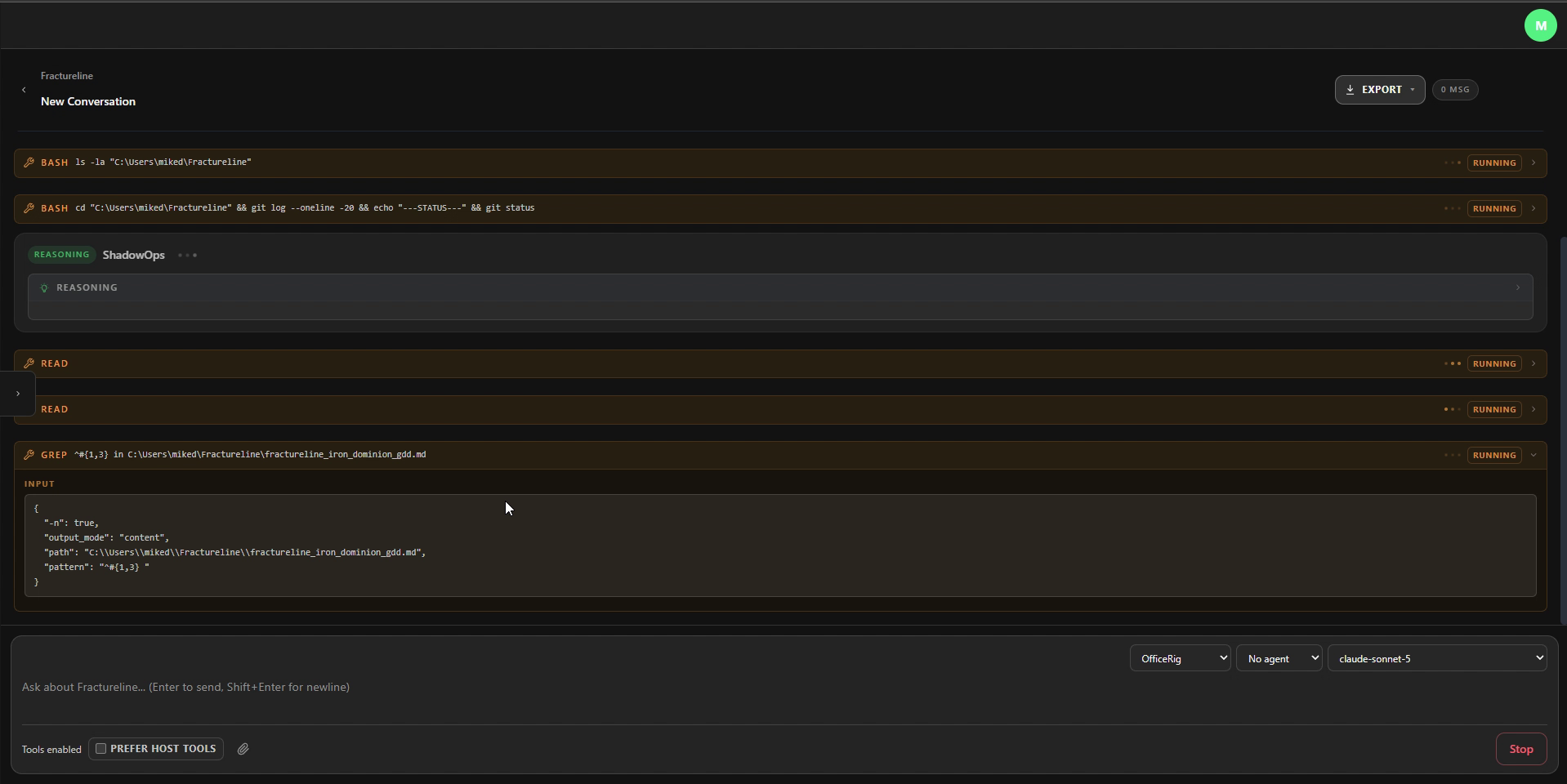
Install the ShadowOps controller on any machine and it shows up in your account. Pick where each chat, operative or workflow runs: your workstation, a headless server, a GPU rig, your phone or a managed cloud controller that stays on when your PC sleeps.
02 Orchestrations
Prompts drift. Graphs don't. Lay the work out as connected nodes on a visual canvas, including agents, models, tools, human approvals, loops and media generation, and ShadowOps runs it the same way every time on the controllers you choose.
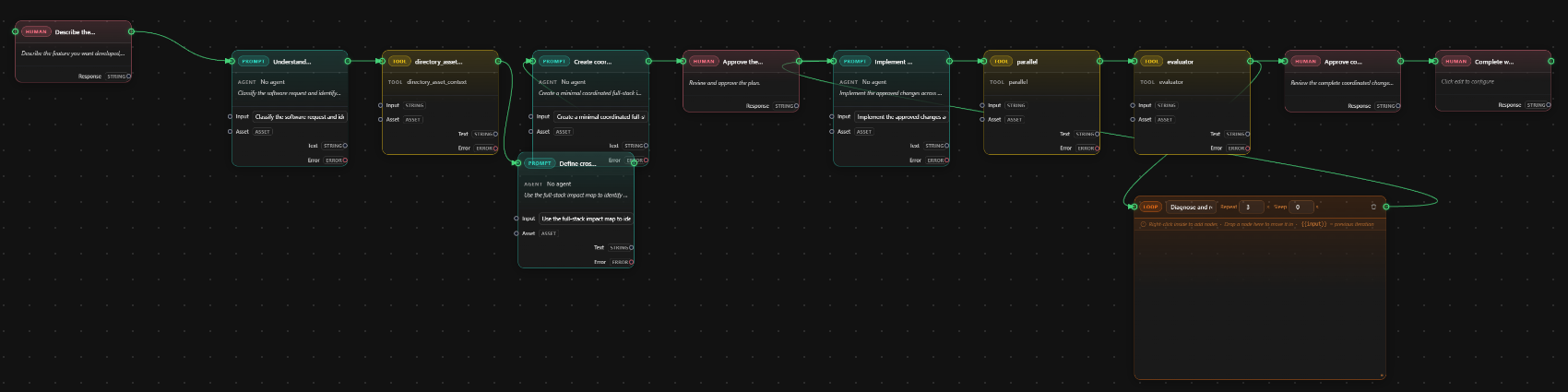
Approval nodes pause the run and ping you on web, Android, Telegram, Slack or Discord.
Fan work out across agents, score the results and loop back to fix failures automatically.
A frontier model to plan, a cheap model to sort and a local model for private data, all in one graph.
Run on a schedule or when an outside system calls in. Inspect every run node by node afterwards.
03 Operatives
An Operative is a persistent assistant with its own name, role, memory, model and tools. Give each one a job, then let it run on a schedule, react to webhooks or loop until the goal is done. Talk to it from the web, the ShadowOps app, Telegram, Slack or Discord. Unlike single-vendor agents, every Operative runs on a controller you choose, using the model you pick.
Every weekday · 7:00
Calendar, weather, the inbox items that actually need you and anything your other Operatives flagged overnight, sent to your phone.
Every 30 minutes
Signs in through a saved browser profile, sorts what needs a reply, drafts responses and leaves sending to you.
Monthly
Reads receipts and statements, spots price increases and forgotten subscriptions, and lists what to cancel.
Market open and close
Summarizes overnight moves, news on what you hold and anything that crosses your thresholds.
On request
Compares products, tracks prices, plans a trip or fills out forms in a real browser, then hands you the final click.
Always on
Keeps the family wiki and todo list current: warranty dates, Wi-Fi details, who's picking up whom.
Before every meeting
Pulls the attendees, past threads and open action items into a one-page brief 15 minutes ahead.
Every morning
Reads what landed in Slack or Discord while you slept, separates urgent from FYI and drafts replies.
Weekly
Checks competitors' sites, pricing and changelogs, and writes up only what changed.
On webhook
A form or ticket arrives, the Operative researches the sender, drafts a reply and queues it for approval.
Friday 16:00
Collects the week's numbers, commits and notes into a report page the whole team can open.
Daily
Drafts posts, generates images and video with your models, and lines them up for you to review.
Every push
Reviews new commits on your own machine, runs the tests and posts findings before you open the PR.
Every 15 minutes
Checks health endpoints, logs and dashboards, and wakes you only when something is actually wrong.
Loop until done
Takes the next todo, implements it in a branch, tests it and waits for your approval to continue.
On your desktop
Drives desktop apps such as Blender, Unity or a spreadsheet in a session you can watch and stop.
Nightly
Checks every repo for outdated or vulnerable packages and opens a summary with the fixes.
On request
Reads the code, updates the wiki pages that drifted and records what changed and why.
04 Local models
Run open models on your own hardware and use them from any controller, whether that's your laptop at a café or a cloud controller at 3 a.m. Requests travel through ShadowOps' authenticated relay, so the model is never exposed to the internet and nobody else can call it.
qwen3-coder
And much more
Always-on controllers hosted for you, included with Pro and above. Nothing to install.
Save logins once on your own controller. Agents browse as you, and you can take over for sign-in or MFA.
Let an agent drive a desktop while you watch live, with a Stop button and optional recording.
A browser video editor whose timeline is built from generated scenes, narration and music.
Invite people, share specific controllers and models, and see usage per member and per space.
Chat with agents and approve workflows from Telegram, Slack, Discord or the ShadowOps Android app.
Connect MCP servers per controller and keep a library of your own Python tools that agents can install and reuse.
Durable memory that every chat, Operative and workflow can read and update, with full version history.
Tokens and cost by model, person, controller and conversation, with charts, filters and CSV export.
Built to be trusted
ShadowOps is the control plane, not the computer. Scripts, shell commands, file access, browsing and model calls all execute on a controller you own or a managed controller dedicated to you. The web service routes and records, and it never touches your files.
For organizations
In most companies, AI adoption happens one laptop, one personal API key and one unsanctioned tool at a time. Nobody can see what ran, where it ran, which model it used or who paid for it. ShadowOps gives engineering and IT leaders one place to govern that work, while the work itself stays on infrastructure you control.
Controllers only make outbound connections, so code, files and credentials stay on hardware you run. There's nothing to open in the firewall and no VPN to change.
Use your organization's own provider keys and subscriptions, or send sensitive work to open models on your own GPUs. Choose the model per agent and per workflow step.
Viewer, Operator, Admin and Owner roles, with email invitations. Team work is kept in its own space, separate from each person's personal work.
Lend a controller to a team with explicit secret and provider grants. You can also remove unapproved provider logins from that machine.
Put approval gates anywhere in an orchestration, then approve or reject from the browser, Slack or a phone before anything irreversible runs.
Usage is recorded against the person and team that ran it, even on a shared machine. Team admins see usage per member, and usage reports export to CSV for chargeback.
Each tool call, approval and token is recorded with the machine and model that handled it, so reviews and incident follow-ups start from facts.
People can export their account data themselves at any time. Deletion requests are completed within 30 days.
Authenticator-app two-factor with recovery codes, remembered trusted devices, and Google or GitHub sign-in.
Getting started
Install it on a PC, Mac, Linux box or Android phone, or start a managed cloud controller.
Sign in to Claude Code or Codex, add API keys, point at Ollama, or use ShadowOps credits.
Chat, build an orchestration, or hire your first Operative and give it a schedule.
Pricing
Shown for reference. Public access isn't open yet, so join the waitlist to be first in.
$0/mo
Platform access with your own provider key and no ShadowOps-funded AI credits.
$19/mo
500 monthly AI credits and 25 GB of storage for creative operators.
Most popular
$29/mo
1,000 monthly AI credits, 50 GB of storage, and one managed cloud controller.
$59/mo
2,000 monthly AI credits, 100 GB of storage, and one managed cloud controller for heavier creative work.
$149/mo
6,000 monthly AI credits, 300 GB of storage, and three managed cloud controllers to share with your team.
Add-ons on any paid plan: extra storage at $10/mo per 100 GB, and non-expiring AI balance top-ups from $5.00 with no processing fee. Included credits reset monthly. Your own provider keys never use them.
FAQ
Those run one vendor's model on that vendor's computers. ShadowOps runs any model, including local ones, on computers you choose, and lets you run many specialized Operatives instead of one generalist. You can also chain them into orchestrations with approval steps.
No. You can use your own keys and subscriptions (Claude Code, Codex, OpenAI, Anthropic, OpenRouter and others), local models through Ollama, or ShadowOps-funded AI credits on paid plans. You can mix them per agent.
Work runs on your controller. ShadowOps stores your chats, settings and results so you can see them anywhere, and relays messages between your devices, but it doesn't run your commands or open your files.
Work targets a specific controller. Put always-on Operatives on a managed cloud controller (Pro and above) or any machine that stays on, and keep heavy local-model work on your GPU box.
Controllers run on Windows, macOS (Intel and Apple silicon), Linux (x64 and ARM) and Android. The control plane is a web app that works in any modern browser, with Android and Windows apps for Operatives.
Yes. Team spaces give you roles, shared controllers with explicit secret and provider grants, per-member usage and approval gates today. Execution stays on controllers your organization runs, so source code and credentials don't have to leave your network. Planning a larger rollout or a security review? Request enterprise access and tell us what you need.
ShadowOps is in private preview. Join the waitlist and we'll email you as soon as public access opens.
Join the waitlist and be among the first to run your fleet on ShadowOps.
Join the waitlist